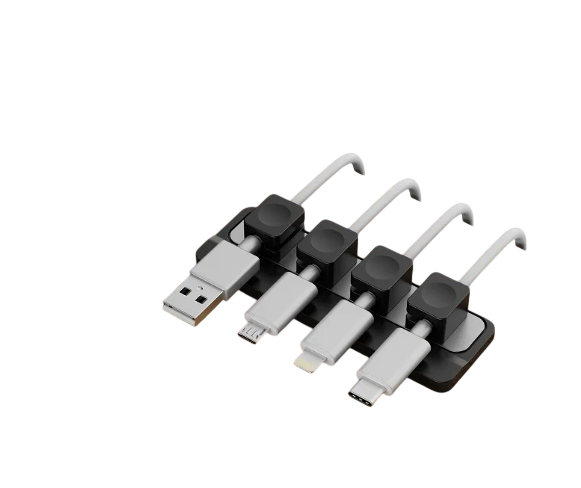
If you browse r/DeskSetup or r/Battlestations on any given day, you will notice a recurring theme: people spend thousands of dollars on solid wood desktops, ultrawide monitors, and bespoke mechanical keyboards—only to struggle with four charging cables pooling in the corner of their workspace.
Most people attempt to solve this with disposable adhesive clips or rubber channels stuck to the edge of the desk. Within a few months, three common frustrations emerge:
- Aesthetic Breakdown: Bright white or colorful charging cords clash with clean, monochromatic desk themes.
- The “Cable Drop” Problem: When you unplug your laptop to take it to another room, the cable slides down behind the back edge of the desk, forcing you to fish it out from under your setup.
- The Modularity Friction: Rigid cable conduits require dismantling your entire wiring loom every time you swap or add a peripheral.
The Problem with Static Clamping
The fundamental flaw in most cable organizers is that they treat cables as static lines that should never move. But charging cables are dynamic interfaces—you pull them toward you to plug in your phone, laptop, or camera, and you want them to return to a neat position when you unplug.
Sticky clips fail because they resist motion. When pulled at an angle, the adhesive shears off, leaving adhesive residue on your desktop.
A Magnetic, Zero-Residue Approach
When engineering the Gridspace™ Desktop Magnetic Cable Dock, our goal was to eliminate adhesive degradation entirely while maintaining one-handed tactile operation.
Instead of gluing clips to your furniture, Gridspace uses a weighted desktop docking station anchored by a non-marking micro-suction base. Four matte silicone collars wrap around your essential cables (USB-C, Thunderbolt, Lightning, and MagSafe). Embedded N52 neodymium magnets snap the collars into the dock’s alignment channel with a satisfying, positive click.
- One-handed docking: Grab a cord to charge, pull it freely, and let the magnetic collar guide itself back to the base when you’re done.
- Surface-friendly: The micro-suction base grips wood, glass, and laminate without glue, and can be repositioned across your desk without leaving residue.
- Whole-desk continuity: For setups that require routing cables from the desktop down to an under-desk power tray, the Complete Studio Kit pairs the magnetic dock with dedicated low-profile routing clips to hide vertical cord drops behind desk legs.
Designing for a Calmer Workspace
A clean workspace isn’t about hiding every tool you own; it’s about reducing visual and physical friction. When your cables stay anchored exactly where you reach for them, your desk stays quiet.
Explore the Gridspace™ Desktop Magnetic Dock ($49 CAD) or the Complete Studio Kit ($79 CAD).