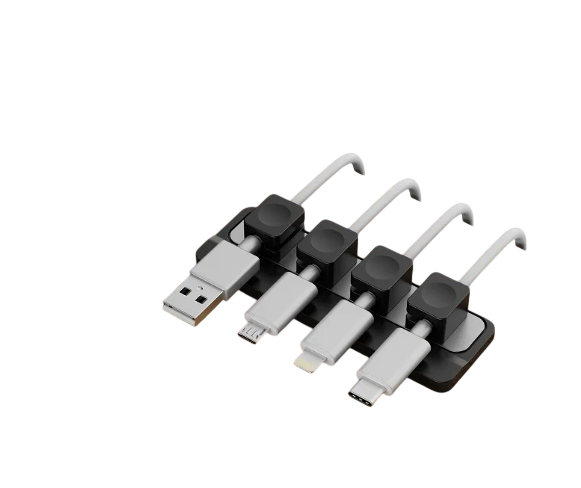
A single-monitor workstation is an exercise in subtraction. You choose one color-accurate display, a compact mechanical keyboard, and a clean timber or matte laminate surface to eliminate visual noise. Yet the moment you unplug your laptop or phone, the illusion of order collapses: charging leads slide off the back edge of the desk, forcing you to crouch on the floor or fish behind the monitor stand.
For years, the only mainstream answer was the disposable plastic clip backed by 3M foam tape. In a minimalist workspace, adhesive clips create three immediate problems:
- Permanent Surface Damage: Acrylic foam adhesive cures into oiled walnut, white oak, and matte desk finishes, leaving sticky residue or tearing veneer fibers when removed.
- Zero Physical Mass: Lightweight plastic clips rely entirely on glue shear strength; one sideways tug on a heavy braided cord pops the clip loose.
- Bulky Visual Clutter: Tall, rounded plastic domes break the horizontal geometry of a flat desktop.
Solving cable drop without compromising architectural lines requires replacing disposable glue with physical mass and magnetic tension—the core engineering thesis behind the Gridspace™ magnetic cable dock desktop system.
How a Magnetic Cable Dock Desktop System Replaces Bulky Clips
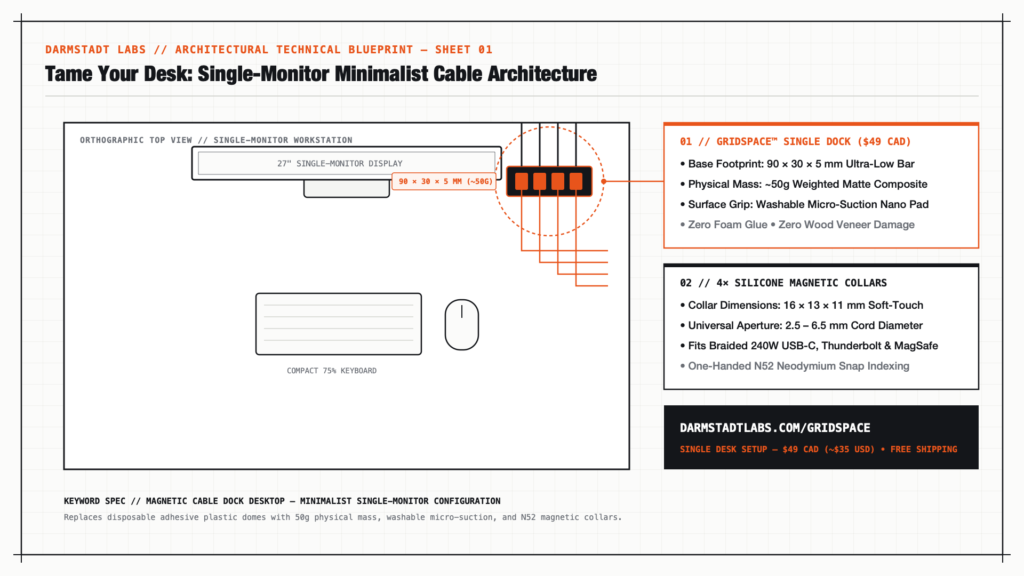
Inspired by Dieter Rams and German functionalist hardware, the Gridspace™ Single Desk Setup ($49 CAD / ~$35 USD) treats cable routing as permanent desktop architecture rather than a temporary plastic accessory.
1. Low-Profile 50g Weighted Geometry (90 × 30 × 5 mm)
Instead of protruding above your keyboard tray, the Gridspace™ dock measures just 5 mm thin (90 × 30 × 5 mm / 3.5 × 1.2 × 0.2 in). Its ~50g weighted matte composite core keeps the center of gravity flush against your tabletop so it visually disappears beside a monitor base or laptop stand.
2. Zero-Residue Micro-Suction Foundation
The underside of the dock uses a high-density micro-suction nano base engineered with thousands of microscopic vacuum pockets. When pressed onto wood, glass, aluminum, or smooth laminate, it locks horizontally against cable pull force without a single drop of chemical adhesive. If you reconfigure your monitor or move apartments, you simply lift the dock, rinse the base with tap water to restore 100% grip, and plant it in its new position.
3. One-Handed N52 Magnetic Collar Indexing (2.5–6.5 mm Fit)
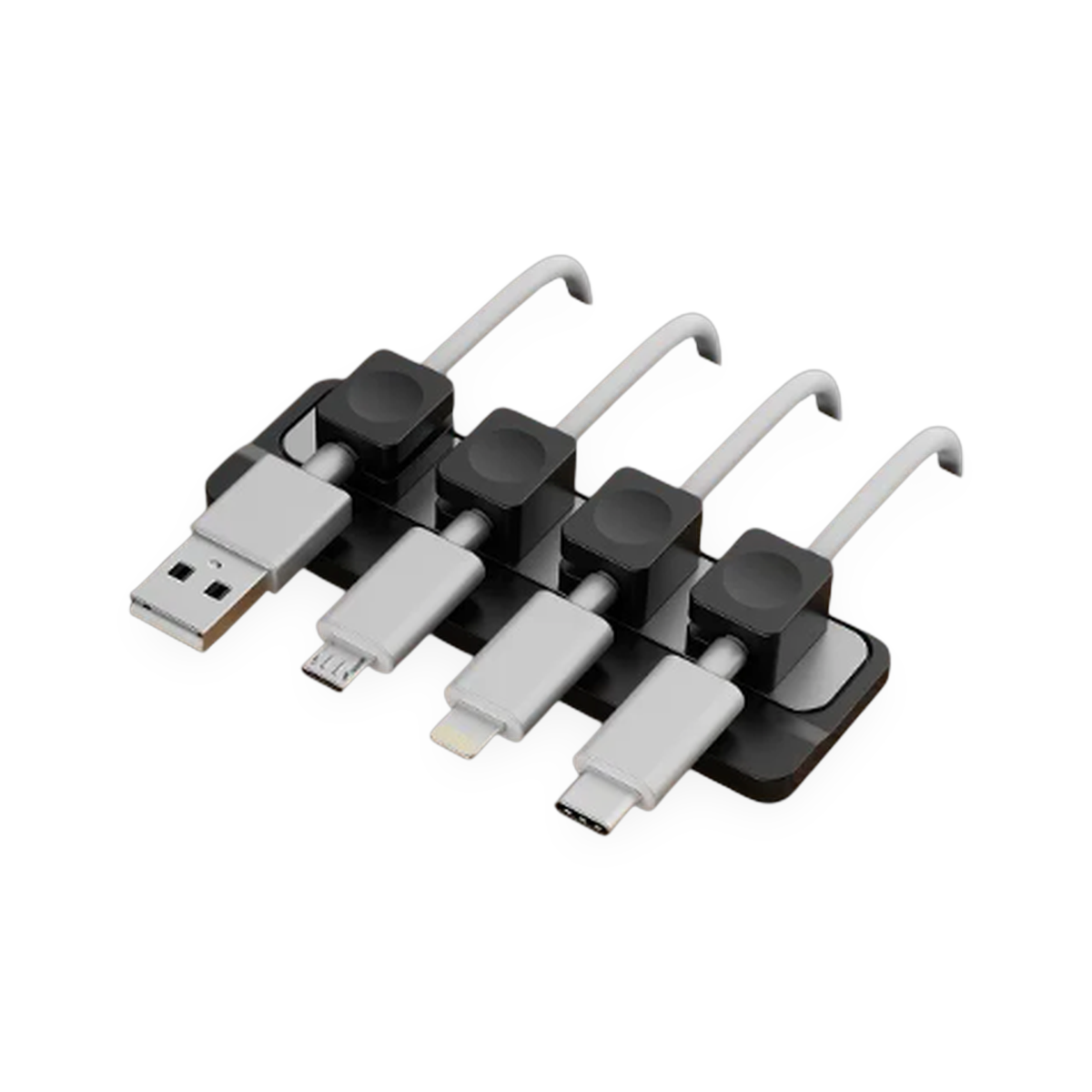
Conventional rubber slots pinch thin cables and reject thick braided cords. Gridspace™ replaces fixed slots with four flexible silicone magnetic collars (16 × 13 × 11 mm) that wrap around any cable from 2.5 mm to 6.5 mm in diameter:
- 240W Braided USB-C & Thunderbolt 4 Leads: Snaps down flat without kinking the outer nylon weave.
- Apple MagSafe & Lightning Cords: Sits indexed along the magnetic channel ready for one-handed pickup.
- Audio & Peripheral Leads: Keeps DAC/amp or keyboard coils anchored at a clean 90-degree angle.
| Specification | Conventional Adhesive Clips | Gridspace™ Magnetic Cable Dock Desktop |
|---|---|---|
| Footprint & Profile | Bulky 18–25 mm plastic domes | Ultra-slim 90 × 30 × 5 mm architectural bar |
| Physical Mass | < 5g hollow ABS plastic | ~50g solid matte composite |
| Desk Mounting | Single-use foam glue (leaves residue) | Washable, zero-residue micro-suction nano base |
| Cable Release | Two-handed prying out of tight slots | One-handed N52 neodymium magnetic snap |
| Cord Compatibility | Frayed or jammed on braided cables | Universal 2.5–6.5 mm flexible silicone collars |
Designing the 3-Minute Single-Monitor Cable Reset
You do not need a full under-desk rewiring session to bring order to a single-monitor desk. Follow this three-step layout protocol:
- Establish Your Primary Charging Zone: Wipe a 10 cm spot along the rear-right or rear-left edge of your desk, roughly 15 cm outside your monitor stand where your hand naturally reaches.
- Anchor the 50g Base: Peel the protective film from the micro-suction pad and press the Gridspace™ Single Dock firmly onto the surface for five seconds to engage the vacuum seal.
- Index Your Four Daily Cords: Snap the four silicone magnetic collars onto your laptop Thunderbolt lead, phone charger, tablet cord, and headphone cable. Drop them onto the N52 magnetic channel—they self-align into parallel lines with a crisp tactile click.
Upgrade Your Workspace Architecture
Whether you work from a compact apartment desk or a dedicated studio table, your hardware should respect your surfaces:
- Gridspace™ Single Desk Setup — $49 CAD (~$35 USD): Includes 1× 50g Weighted Magnetic Dock + 4× Silicone Magnetic Collars. Ideal for single-monitor minimalists.
- Gridspace™ Duo Set — $84 CAD (~$60 USD, Save $14): Includes 2× Weighted Docks + 8× Silicone Collars for dual-workstation or desk-and-nightstand continuity.
- Gridspace™ Complete Studio Kit — $79 CAD (~$57 USD): Pairs 1× Desktop Magnetic Dock with 6× Under-Desk Frame Routing Clips for standing desks.
Every order includes free tracked shipping across Canada and the United States (2–4 business days) and a 30-day money-back trial. Explore the Gridspace™ system at Darmstadt Labs →